
How to change WordPress dashboard language is one of the most common questions beginners ask — and the answer is actually simple:
- WordPress allows you to switch your dashboard language in just a few clicks, either for the entire site or for individual users.
- Whether you want to use English, Arabic, French, or any other language.
- you don’t need plugins or coding — just a few settings inside your dashboard.
In this guide, you’ll learn exactly how to do it step by step, plus some useful tips to avoid common mistakes.
Headings
How to Change WordPress Dashboard Language from Settings
If you want to change the language for your entire website, this is the easiest method.
Start by logging into your WordPress dashboard. From there:
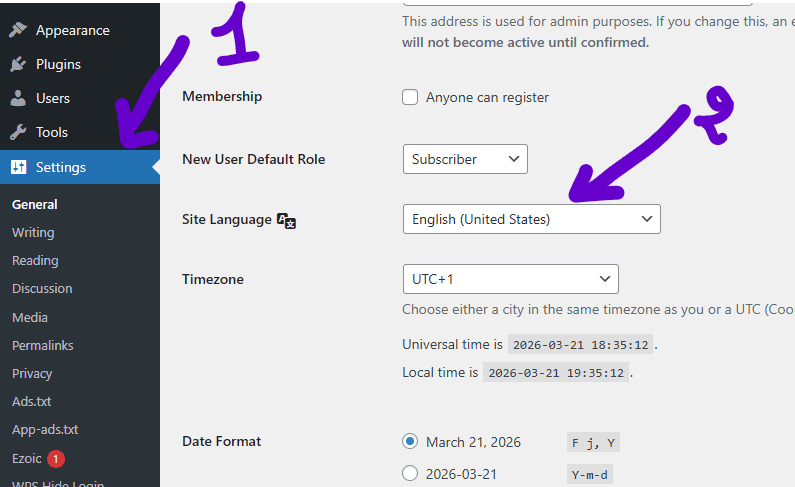
- Go to Settings
- Click on General
- Scroll down to Site Language
- Choose your preferred language from the dropdown
- Click Save Changes
That’s it.
Your dashboard — and sometimes parts of your site — will instantly switch to the selected language.
WordPress supports dozens of languages, and most major ones are fully translated. However, some themes and plugins might not follow this setting perfectly.
So here’s the next logical question:
What if you only want to change the language for yourself, not the entire site?
How to Change WordPress Dashboard Language for a Single User
This is a powerful feature that many users don’t even know exists.
Let’s say you’re managing a multilingual team. You might prefer English, while someone else prefers French or Arabic. WordPress makes this easy.
Here’s how:
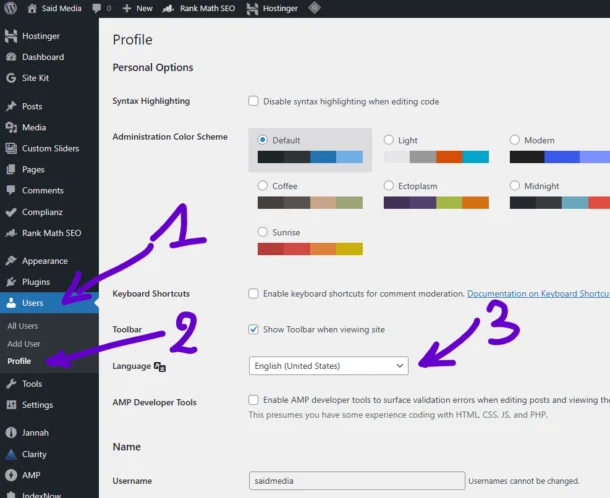
- Go to Users
- Click on Profile (or “All Users” → select your profile)
- Find the Language option
- Choose your preferred language
- Click Update Profile
Now your personal dashboard language will change — without affecting other users.
This is especially useful for agencies, freelancers, or teams working across different regions.
But this raises another important question:
What if the language you want isn’t showing up in the list?
Why Some Languages Don’t Appear in WordPress
If your desired language isn’t available, don’t worry — there are a few possible reasons.
First, WordPress may need to download the language pack automatically. In most cases, it does this in the background.
But if it doesn’t:
- Your hosting might restrict downloads
- Your WordPress version might be outdated
- The language may not be fully supported yet
To fix this, make sure your WordPress installation is up to date.
You can also try switching the site language first — this sometimes forces WordPress to download the necessary files.
Still not working?
Then you might need a different approach.
Can plugins help you add or manage languages more effectively?
Using Plugins to Change WordPress Dashboard Language
While WordPress doesn’t require plugins for basic language changes, plugins can offer more flexibility.
For example, multilingual plugins allow you to:
- Translate your entire website
- Manage multiple languages easily
- Customize translations
Popular options include tools like translation managers and multilingual frameworks.
However, keep in mind:
Plugins can add complexity and may slow down your site if not configured properly.
So unless you’re running a multilingual website, the built-in settings are usually more than enough.
But this leads to another key question:
Does changing the dashboard language affect your website content or SEO?
Does Changing WordPress Dashboard Language Affect SEO?
Short answer: No — not directly.
Changing the dashboard language only affects the backend (your admin interface), not your actual website content.
Your visitors will still see your website in the language your content is written in.
However, if you’re planning to create a multilingual site, that’s a different story.
In that case:
- You’ll need translated content
- Proper URL structures (like /en/ or /fr/)
- SEO optimization for each language
So while dashboard language doesn’t impact SEO, your content strategy definitely does.
Now here’s something many users overlook:
What about themes and plugins — do they follow the language change automatically?
Do Themes and Plugins Change Language Automatically?
Not always.
Even if you change your WordPress dashboard language, some themes and plugins may remain in their original language.
Why?
Because they need their own translation files.
Well-coded themes and plugins usually include multiple language packs, so they adapt automatically. But others may require manual translation.
If you notice mixed languages in your dashboard:
- Check if the plugin supports translations
- Look for language settings inside the plugin
- Update the plugin to the latest version
This can be a bit frustrating, especially for beginners.
So the next question becomes:
Is there a way to fully control translations across your entire WordPress site?
Best Practices for Managing WordPress Languages
If you want a smooth experience, follow these simple tips:
- Always keep WordPress updated
- Use well-supported themes and plugins
- Avoid installing too many translation plugins
- Test language changes before applying them site-wide
Also, if you’re running a professional website, consistency matters.
Mixing languages in your dashboard or frontend can look unprofessional and confuse users.
That’s why it’s important to plan your language setup from the start.
But here’s the final and most important question:
What’s the easiest and safest way to change your WordPress dashboard language today?
Final Thoughts — The Easiest Way to Change WordPress Dashboard Language
Changing your WordPress dashboard language is one of the simplest things you can do — yet it can make a huge difference in your workflow.
Whether you’re more comfortable in English, Arabic, or any other language, WordPress gives you full control without needing technical skills.
For most users, the built-in settings are all you need.
No plugins. No coding. No hassle.
Just a few clicks — and your dashboard feels like home.
👉 Now tell me: Which language are you using in your WordPress dashboard right now — and are you thinking of switching it? Drop your answer in the comments! 👇




You could definitely see your expertise within the work you write.
The arena hopes for more passionate writers like you who aren’t afraid to say how they
believe. At all times follow your heart.
Wow, fantastic weblog structure! How long have you been running a
blog for? you make running a blog look easy. The entire look of
your site is excellent, let alone the content!
I’d like to thank you for the efforts you have put in writing this website.
I really hope to check out the same high-grade content by you later on as well.
In truth, your creative writing abilities has motivated me to get
my own, personal site now 😉